Issue 043
Topic: Passwords and sign-in
If your password keeps failing, you may have signed up another way.
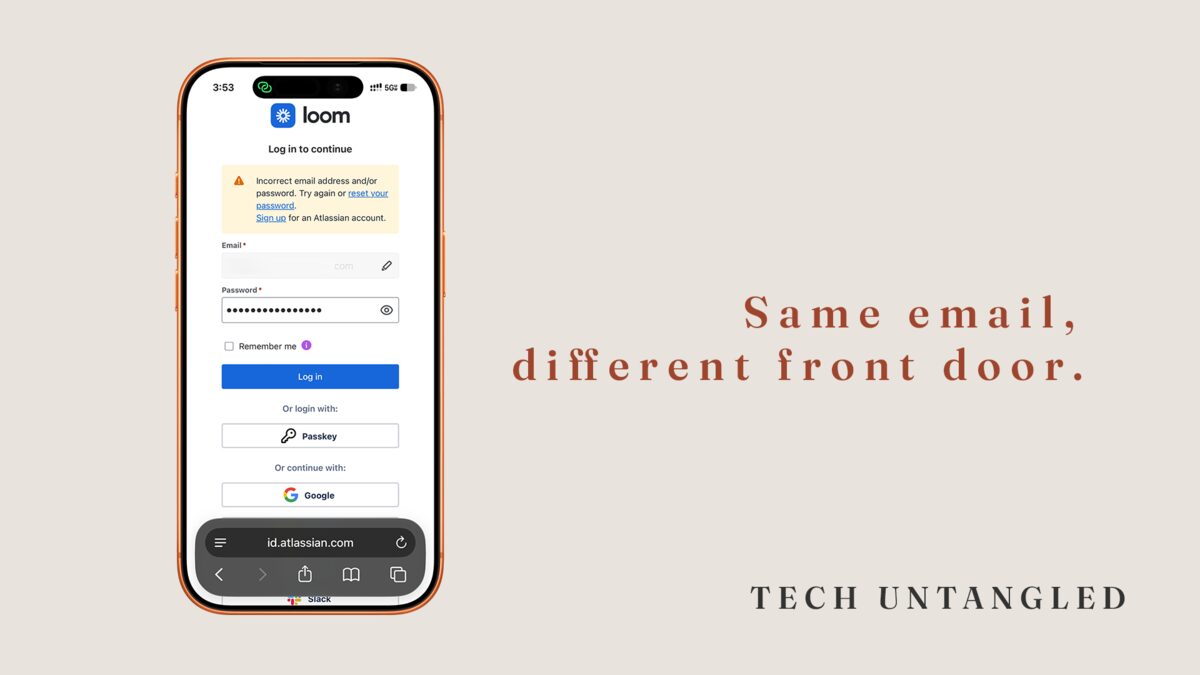
I use Loom at work, and for a long time its sign-in page confused me. I would type my work email and my password and it would never let me in. Eventually I tried the button that says to continue with Google, and it worked.
The same email address got me nowhere with a password and straight in with Google. My work address runs on Google, and I typed it exactly the same way both times. The only thing that changed was which button I used.
An account remembers how you signed up, not only your email address
When you make an account, the site writes down two things. One is your email address. The other is how you proved you were the person who owns it.
Sometimes that proof is a password you made up and registered with that site. Sometimes it's a button like Continue with Google or Sign in with Apple, which I wrote about back in issue 024. With those buttons, Google or Apple tells the site it's really you. Google checks your Google password, the site never sees it, and the site never asks you for one.
Those are two separate passwords. The one you register with the site lives with the site. The one behind the Google button lives with Google. They don't know about each other.
If an account was opened the second way, the site has no password of its own for you. You type your email, you type a password you're sure you must have used, and nothing matches because nothing was ever set. It feels like you forgot something, and you may not have forgotten anything.
That was my Loom account. It signs in through Google, so the password box was checking for a password Loom never had.
The sign-in page won't tell you which way you went
The message for a wrong password and the message for a wrong way of signing in can read exactly the same. Mine said "Incorrect email address and/or password." My email address was right. The only thing wrong was the way I was trying to get in, and the message had no line for that. It blamed the two things I had typed, so I kept checking those, and it never mentioned the Google button a few inches below it. That is what makes it feel like your fault, and it was never telling you anything useful.
Companies change hands and the sign-in changes with them
Atlassian owns Loom now, and Loom's help pages say that signing in is linked to an Atlassian account for people who have one. Their page on trouble getting in says to use your old Loom email and password if you only ever had a Loom account, and your Atlassian login if you already had one of those. It also says that if your videos aren't where you expect, you may have two accounts under different email addresses.
Nothing on the sign-in screen tells you any of that. It asks for an email address, and an email address looks like one thing. Behind it there can be more than one way in, and sometimes more than one account.
What to do when a password won't work
Stop retrying it. Some sites will lock you out for a while if you keep going, and after two or three tries you're only guessing at something that may not exist.
Look at the rest of the sign-in page. Buttons for Google, Apple, Microsoft or Slack are other ways into the same account. Try the one that matches your email address. If it's a Gmail address, or a work address that runs on Google like mine does, try Google first. If it's an iCloud address, try Apple.
If no button fits, tap Forgot password on the same page. The site emails a reset link to the address it has on file. If nothing shows up, check your spam folder, and think about whether you signed up with a different email address than the one you're typing.
You can also search your own inbox for the company's name. The welcome message from the day you signed up went to whichever address you used, and that tells you which one to try.
If you get in and the account looks unfamiliar, with things missing that you expected to see, you may be in the other account. Sign out and try your other email address.
Once you're in, some sites will let you add a password to an account you opened with Google, and some won't. I haven't checked Loom. If the button works every time, you may not need one.
One Simple Win
Pick one account you've had trouble getting into. Open its sign-in page and read the buttons. If one matches your email address, try it.
When you're in, open the Notes app on your phone and write one line with the name of the site and how you got in. It takes about five minutes. The next time that account locks you out, you can read your own note instead of guessing.