Issue 035
Topic: Privacy
Every app has a page listing what it can reach. You've never read it.
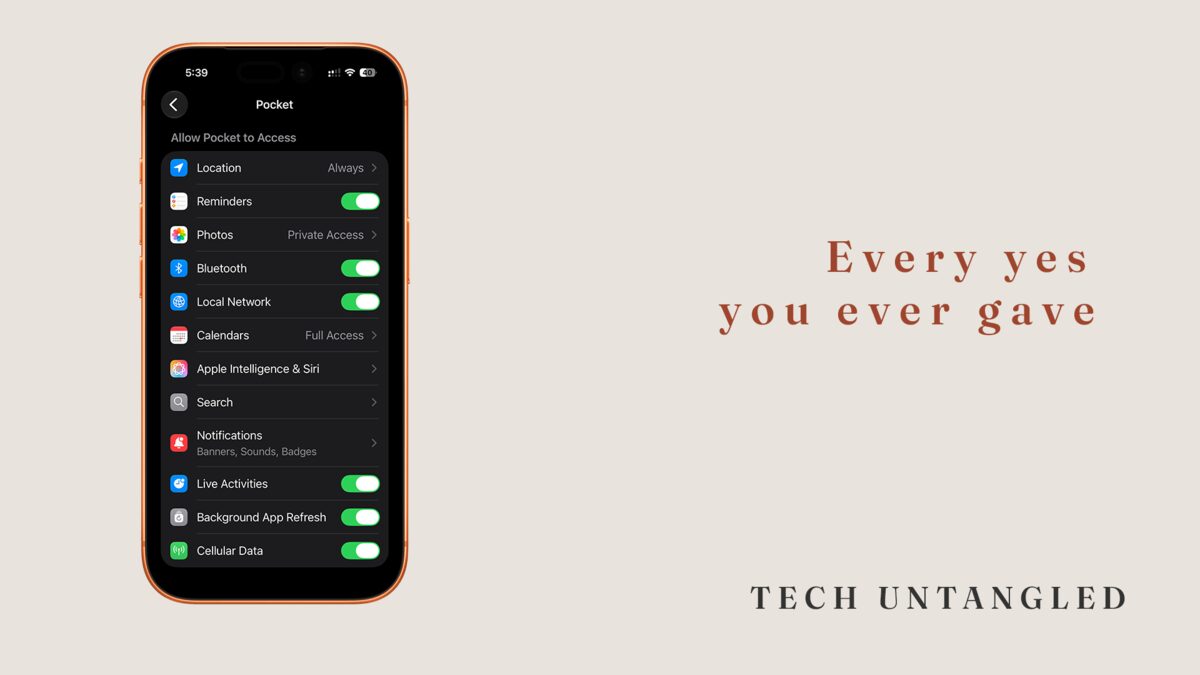
I was looking for something else. That is how this always starts.
I was in Settings on my iPhone, hunting for a toggle I had turned on months earlier and could not find again, and I ended up somewhere I had not meant to go. Not an app's own settings, the ones you reach from inside the app. The page above that. The one your phone quietly keeps for every app you install.
It listed twelve things that app was allowed to reach. My location, set to Always, which means it can check where I am even when I am not using it. My reminders. My photos. Bluetooth. The devices on my home network. My calendars, at full access, which means it can read every appointment I have and not just add one.
I had said yes to all twelve. I could not tell you when I said yes to any of them.
That page is a receipt, not a menu
Every switch on that page began life as a small gray box that appeared in the middle of my screen while I was in the middle of something else. Allow this app to access your Calendars? Two buttons. Maybe a second of real attention, most of it spent wanting the box gone so I could get back to whatever I opened the app to do.
The app did nothing wrong. It asked. I said yes. That is the system working exactly the way it was built to work.
Here is the part nobody explains. The question gets asked once, at the worst possible moment for making a considered decision, and the answer stays in effect indefinitely. Nothing checks back. No app has ever tapped me on the shoulder six months later to ask whether it still needs my calendar. The yes just keeps being true.
So the page in Settings is not a menu of choices you are about to make. It is the accumulated record of choices you already made, one second at a time, months or years apart, while you were busy.
And reading that record all at once is a completely different experience than answering it one box at a time. That is the whole thing. That is why the page exists, and why almost nobody opens it.
What the switches actually control
A per-app page pulls from a fixed set, and a row only appears if the app has asked for that thing at least once. So the page doubles as a rough map of what the app has wanted from you.
The rows fall into three groups, and only one of them deserves real attention.
Reach permissions. Location, Contacts, Calendars, Photos, Reminders, Microphone, Camera, Bluetooth, Local Network. These are the ones where the app is reaching into something outside itself, something that is yours. Read these closely.
Two of them carry more than an on and an off. Location offers Never, Ask Next Time, While Using, and Always, and Always means the app can check where you are when you are not using it. Calendars separates Add Only from Full Access, because plenty of apps have a good reason to put an event on your calendar and no reason at all to read the rest of it. If an app is sitting on Full Access and the only thing it has ever done is add a booking, Add Only is the honest setting.
Attention permissions. Notifications, Live Activities, Siri and Search suggestions. These do not reach into your data. They compete for your screen. Back in issue 020 I made the case for sorting these by urgency rather than switching them all off, and that still holds.
Resource permissions. Background App Refresh and Cellular Data. These govern what the app is allowed to spend while you are not looking. Background refresh lets it wake up on its own and update itself. Cellular data lets it do that on your phone plan instead of waiting for Wi-Fi.
The same information, cut the other direction
There is a second page holding the same facts from the opposite angle. Instead of one app and everything it can reach, it shows one permission and every app that has it.
On iPhone that lives in Privacy and Security, with its own entry for Location Services, Contacts, Calendars, Photos, the microphone, and so on. Open Location Services and you get every app on your phone with its current location setting listed beside it.
Read one app's page and you learn something about that app. Read one permission's page and you learn something about yourself. Location Services is usually the uncomfortable one, because that is where you find the app you used twice, two years ago, still holding Always.
How to actually go through it
On iPhone, open Settings and scroll to the bottom, past everything else, to where your installed apps are listed alphabetically. Tap any one of them. That is the page. For the reverse view, open Settings, then Privacy and Security, then choose the permission you want to look at.
On Android, open Settings, then Apps, tap the app, then Permissions. For the reverse view, look for Permission manager inside the Privacy section. Android will also show you the permissions an app has asked for and not been granted, which iPhone does not.
Both let you revoke anything at any time, and nothing breaks permanently. If an app genuinely needs the thing you just turned off, it will ask again the next time it needs it. Only now you will be answering that question at a moment when you actually understand what it is for.
That last part is worth sitting with. Turning a permission off is not a commitment. It is a way of moving the question to a better moment.