Issue 040
Topic: Privacy
Your phone is listening. Nobody told you what that actually means.
Last week a Facebook page with a blue checkmark next to its name posted a graphic of the new Apple Watch beside an iPhone, with a headline across the top that read "Apple Watch now listens to your conversations." The caption ended with a grimacing face emoji.
It got under my skin more than it should have. I wear an Apple Watch, and mine is too old to have the feature they were talking about, so it wasn't personal. What bothered me is that the headline isn't technically wrong. It's written so the scariest reading is the one you land on first, and it leaves out the one thing you'd need to know to decide how you feel about it.
Your phone has been listening for its name for years
This is the part that almost never gets explained. If you've ever said "Hey Siri" or "Hey Google" and had your phone answer, then your phone was listening before you said it. It had to be, because there's no other way for it to hear its name.
What it's doing is small, and Apple has published how its version works. A low-power chip inside the phone takes in a fraction of a second of sound at a time and checks whether that sliver sounds like the wake phrase. If it doesn't, the phone lets it go and checks the next sliver. That check happens on the phone itself, and nothing goes anywhere unless the phone thinks it heard its name.
So "listening" covers a lot of ground. On one end is a phone checking a sliver of sound for two words and throwing it away. On the other end is a recording that gets kept and sent off somewhere for someone to go through. Those are very different things, and the headline uses one word for all of them.
The useful question about any device was never whether the microphone is on. It's what happens to the sound after the microphone hears it.
Why the ads feel like they heard you
If you've ever talked about something out loud and then seen an ad for it that afternoon, it makes sense that it felt like proof.
In 2018 a team at Northeastern University tested more than 17,000 popular Android apps to see whether any of them were quietly switching on the microphone and sending audio off the phone, and they didn't find a single one. What they found instead was apps that could capture what was on the screen, and at least one that was sending recordings of people's screens to an analytics company, which is its own problem and not the one anybody was worried about.
Advertising systems run on things like what you searched for and where your phone has been, and that turns out to be plenty. Then there's how memory works, because you remember the one ad that matched something you said at dinner, and the hundreds of ads that had nothing to do with anything never register at all.
The time it really did go wrong
I'm not going to pretend this has a spotless history, because you'd be right not to trust me if I did.
Wake words misfire, and a phone can think it heard its name when it didn't, which means it starts listening for a request nobody made. In 2019 a whistleblower told reporters that Apple had contractors listening to some Siri recordings to grade how well Siri was working, and that accidental activations were among them, with personal details nobody meant to share. Apple changed how it handled those recordings, and in 2025 a judge approved a $95 million settlement of a class action over Siri, which Apple agreed to without admitting it did anything wrong. You may have gotten an email about that settlement.
Today Apple says it doesn't keep audio of your Siri requests unless you've chosen to share it to help improve Siri, and that it has never made Siri data available for advertising.
What the new watch actually does
Siri Recap, on the new Apple Watch Series 12 and Ultra 4, does listen to conversations, since that's what the feature is for. It's also off until you turn it on, and when you do, you pick when it runs, so you can have it on only at work or never at night. Apple says the watch doesn't make an audio recording at all. The sound is handled inside a walled-off part of the chip that no app can reach, and neither can Apple, and what comes out the other end is a written summary that deletes itself after seven days unless you save it.
The honest catch is the people around you, who didn't turn anything on. Apple's own guidance tells owners to be mindful of that, and it says the summaries can be incomplete or wrong. It's a fair thing to think about before you schedule it for a family dinner.
How to check for yourself
Your phone has been telling you when the microphone is in use this whole time, it's just that nobody ever showed you where to look.
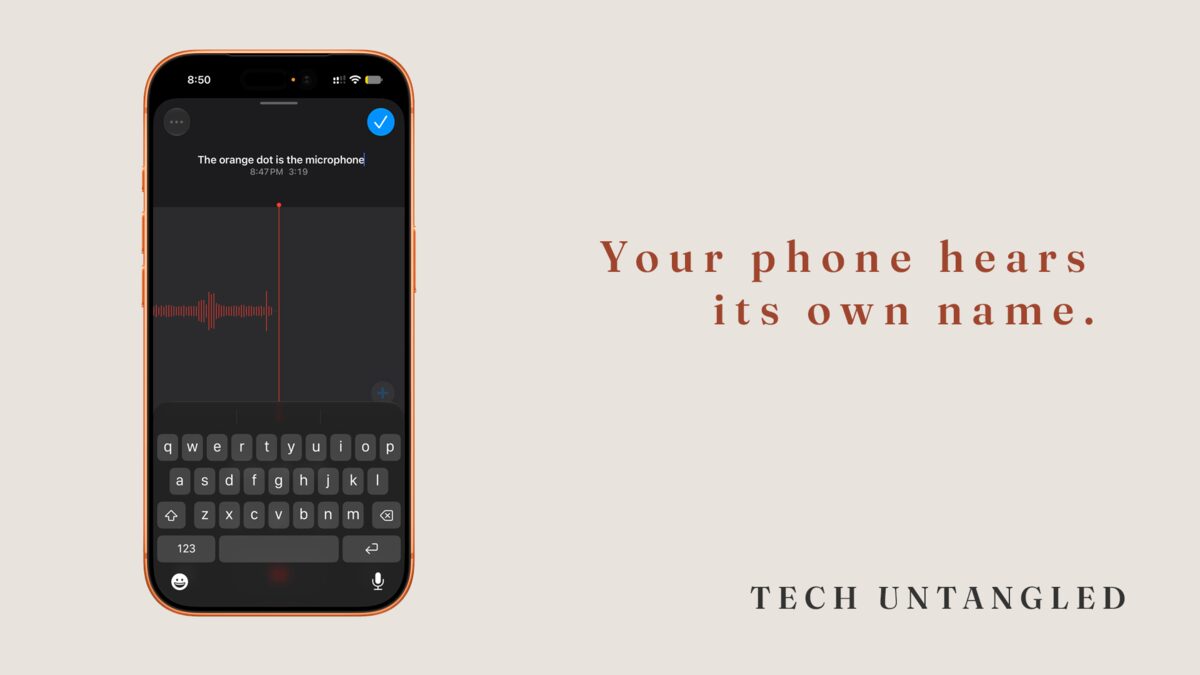
On iPhone. An orange dot at the top of the screen means an app is using the microphone right now. A green dot means the camera is on, or the camera and microphone together. If you see one and don't know why, swipe down from the top right corner to open Control Center, and the name of the app shows at the top. On an iPhone with a Home button, swipe up from the bottom instead.
To see every app you've ever given the microphone to, open Settings, go into Privacy and Security, and tap Microphone. Back in issue 035 I walked through that page and the ones around it. It's worth a slow read, because every app on it is one you said yes to at some point.
On Android. Android 12 and newer shows a green indicator in the top right corner when an app is using the camera or microphone. Swipe down and tap it to see which app. In Quick Settings, which you get to by swiping down twice, there's usually a tile that switches microphone access off for the whole phone. The list of apps with microphone access lives in the permission manager in Settings.
The dots show up for ordinary reasons too, like a voice memo or a video call. Seeing one doesn't mean anything is wrong, it just means you can find out what's using the microphone instead of wondering.
One Simple Win
Open Voice Memos on your iPhone, or any recorder app on Android, and start a recording. Look at the top of the screen and find the dot. Stop the recording and watch it go away.
Then open the Microphone list in Settings and read down it. If there's an app on there that has no reason to hear you, a game or a shopping app, switch it off.
That's about three minutes. The next time a headline tells you your devices are listening, you'll know where to look to see what's actually going on.