Issue 032
Topic: Scams and safety
You've been screening your own calls by hand for years
My phone rang three times during dinner last week. Same area code as mine, a number I didn't recognize. I let it go to voicemail, checked a minute later, and there was nothing. No message. There never is.
I've gotten good at this. The phone rings, I glance at it, I decide it's probably nobody, and I let it ring out. At some point, without noticing, I turned answering my own phone into a small act of suspicion. You probably have too. We treat every unknown number as a decision to make, ten times a day, and we call that normal.
The phone still trusts whoever is calling
Here's the part nobody explains. The phone network was built to connect anyone to anyone. That was the whole point of it. When a call comes in, your phone shows you the number the caller's system claims to be calling from. It's a label, passed along, and your phone displays it in good faith.
That label can be faked. It's called spoofing, and it's why so many spam calls share your area code and even the first three digits of your own number. The caller picks a number that looks local because a local number is the one you're most likely to answer. The call isn't coming from your neighborhood. It's just wearing your neighborhood's clothes.
Once you understand that, a lot of your habits stop making sense.
Blocking numbers is a bucket with a hole in it
When a spam call gets through, the natural move is to block that number. It feels like progress. You did something.
But the number was never real. It was borrowed for that one call and thrown away. Block it and the next call comes from a slightly different one. You can block numbers every day for the rest of your life and never get ahead, because you're fighting individual disguises instead of changing the rule that lets strangers through in the first place.
That's the workaround so many of us settled into. We stopped answering. We let it ring, we screened by hand, we accepted that the phone interrupting us for strangers was just how phones are. It isn't. There's a better move than silence, and it's been sitting in your settings.
Let the phone ask the question you never get to ask
If a stranger knocked on your door, you'd say "who is it?" before you opened it. The phone never gave you that step. It rang, and you either picked up blind or ignored it. There was no in-between.
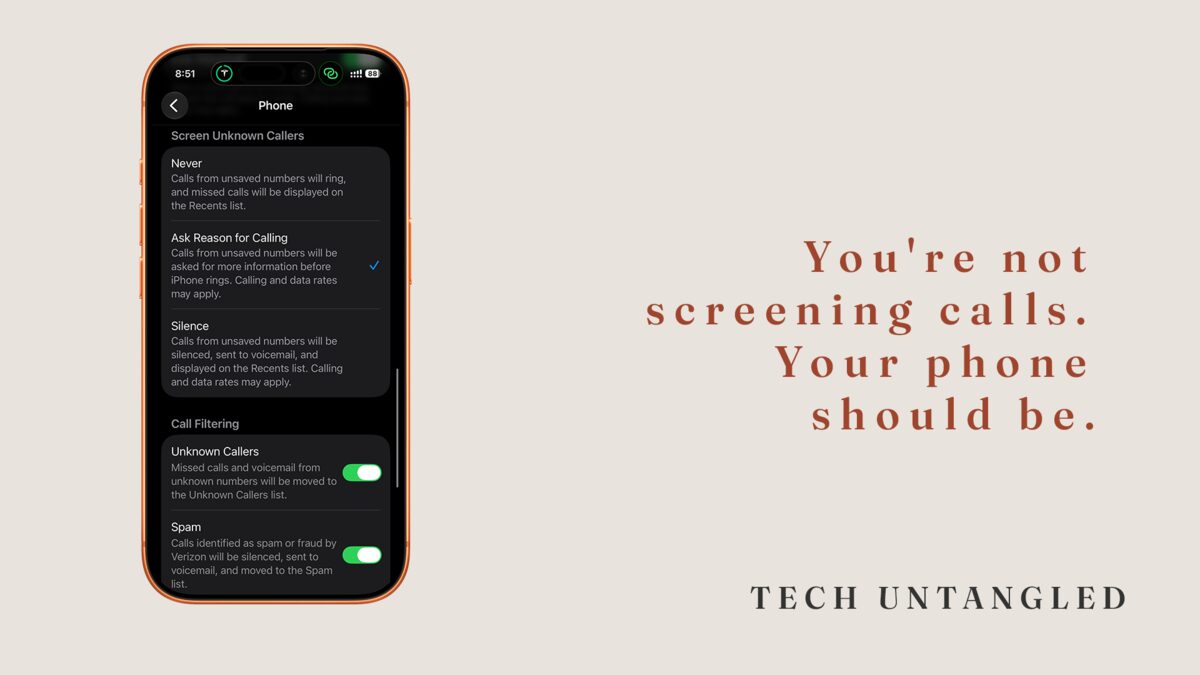
Now there is. Your phone can answer unknown callers for you and ask them to say who they are and why they're calling. It holds them there, turns their answer into text, and shows it to you before your phone ever rings. A real person says "this is the pharmacy, your prescription is ready," and the call comes through with that note attached. A robocall has nothing to say and drops. A scammer, asked point blank to identify himself, hangs up almost every time. You didn't block anyone. You just made them go first.
This is why I recommend the ask-them-first approach over simply silencing unknown callers. Silencing is blunt. It sends every stranger to voicemail, including the delivery driver and the doctor's office calling back, and you find out later. Asking the reason keeps the good calls flowing while the junk filters itself out in real time. You lose nothing and you interrupt no one who matters.
On iPhone
Open Settings, tap Apps, then tap Phone. Find Screen Unknown Callers and choose Ask Reason for Calling. From then on, anyone not in your contacts or your recent calls gets the automated prompt, states their business, and you see it written on screen before you decide. People you know still ring straight through. Nothing about calls from family or saved contacts changes.
On Android
Many Android phones, especially Google Pixel, have the same thing under a different name. Open the Phone app, tap the three-dot menu, then Settings, then look for Call Screen. Turn it on so unknown callers are asked who they are and their answer is transcribed for you. If your phone doesn't offer Call Screen, go to the same Settings menu, open Caller ID and spam, and turn on spam protection and Filter spam calls so known junk gets labeled or stopped before it rings.
One Simple Win
Turn on the ask-them-first screening today. On iPhone, it's Settings, Apps, Phone, Screen Unknown Callers, Ask Reason for Calling. On Android, it's the Phone app, three-dot menu, Settings, Call Screen. Two minutes, and your phone starts asking "who is this?" so you don't have to.