Issue 011
Topic: Device care
Your laptop isn't slow. You've just been managing around it.
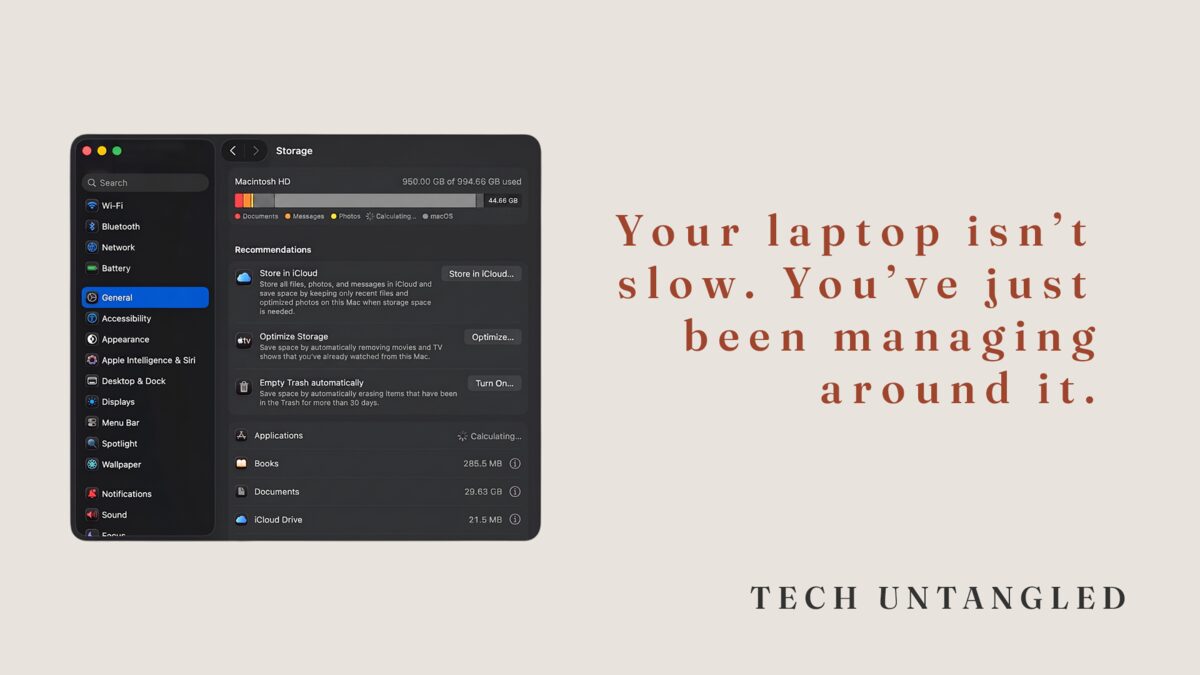
The problem is almost never what people think it is.
Last week, I sat down with a friend to look at his laptop. He's sharp. Knows his way around technology. But his machine had been sluggish for a while and his whole workflow had quietly rearranged itself around the problem without him fully realizing it.
That last part is the thing that stays with me.
The Core Idea
There's a particular kind of technology problem that never announces itself.
It doesn't crash your system. It doesn't show an error message. It just creates a little friction, and you adapt to that friction, and then the friction becomes normal, and then you forget it was ever a problem at all.
By the time you notice something is wrong, you've usually been living with it for months.
This is how most technology problems actually work. Not dramatically. Gradually. And the gradual ones are harder to fix, not because the solution is complicated, but because you've stopped seeing them clearly.
What I Found
In my friend's case, the culprit was Apple Messages. Specifically, the attachments folder that Messages keeps in the background. Every photo, meme, video, and PDF anyone had ever texted him, sitting quietly in storage, never clearing itself, never asking permission, just accumulating.
Eighty gigabytes.
He had no idea it existed. Nobody told him it was there. The app doesn't surface it, the storage readout doesn't label it clearly, and there's no alert that says "this is why your machine feels like it's underwater."
So instead of fixing it, he worked around it. Saved things in different places. Changed how he organized files. Spent extra energy on tasks that should have been automatic.
The fix took about four minutes. Actually longer, but only because the computer was so bogged down trying to clean itself.
The rearrangement of his entire workflow had taken months.
Why This Keeps Happening
Devices don't tell you when something is quietly consuming resources in the background. They're not designed to. The operating system tracks storage but doesn't explain what's filling it in plain language. Apps accumulate data as a feature, not a flaw, and clearing that data is buried several layers deep in settings most people never open.
This isn't an accident. It's a design reality. The assumption built into most devices is that users will either figure it out or not notice. Most people don't notice. They adapt.
The adaptation feels responsible. You're managing, staying functional, getting things done. But underneath it, you're spending real energy compensating for a problem that has a simple solution you just haven't found yet.
How to Look for Your Own Version
The question worth asking isn't "is something wrong with my device." It's "is there anything I've quietly stopped using, started working around, or given up on that I haven't thought about in a while."
That's usually where the problem is.
On an iPhone or iPad, go to Settings, then General, then iPhone Storage. Your device will show you a breakdown of what's consuming space, including large attachments inside apps like Messages. Look for anything that seems disproportionately large relative to how often you actually use it.
On a Mac, click the Apple menu, then About This Mac, then More Info, then Storage Settings. You'll see a similar breakdown. Look for the same thing: anything consuming space quietly in the background.
You're not looking for a specific problem. You're just looking. Most people who do this find at least one thing that surprises them.
I did it myself after helping my friend. Found 28GB of apps I hadn't opened in over six months, sitting there, fully installed, fully taking up space, fully unnecessary.
I help people with this for a living. I still had my own version of the same problem.
One Simple Win
Open your device's storage breakdown today. iPhone and iPad: Settings, General, iPhone Storage. Mac: Apple menu, About This Mac, More Info, Storage Settings.
Don't try to fix everything. Just look for one thing that surprises you and deal with that one thing. Delete the attachment cache. Offload the app you haven't touched in a year. Clear the thing you kept meaning to clear.
Four minutes. One thing. That's it.