Issue 016
Topic: Device care
Your digital life doesn't have a will.
A friend of mine, Lucas, lost his grandfather a few weeks ago. 98 years old. Lived a full, beautiful life.
But there was one thing the family didn't have set up on his devices. One setting, buried a few taps deep, that nobody had ever shown them. And because it wasn't there, the photos, the notes, the messages on his phone and in his iCloud account were locked behind a wall that Apple couldn't just open. The devices themselves were bricked by Activation Lock.
Lucas was honest enough to post about it publicly so the rest of us could learn from it.
And I keep thinking about the scene he described. Because some version of it is playing out in kitchens and living rooms all over the country, every single week. Someone dies. The family gathers. And at some point, someone picks up a phone or opens a laptop and realizes they can't get in. Not because they don't know the person. Because the person never set up the one thing that would have let them through.
We spend years accumulating a digital life. Photos. Messages. Documents. Entire inboxes full of conversations we never printed out. And almost none of us have told anyone how to get to any of it when we're gone.
That's not a tech problem. That's a conversation problem. And each of the big three platforms handles it differently enough that it's worth understanding what you're actually dealing with.
Apple: The One That Works
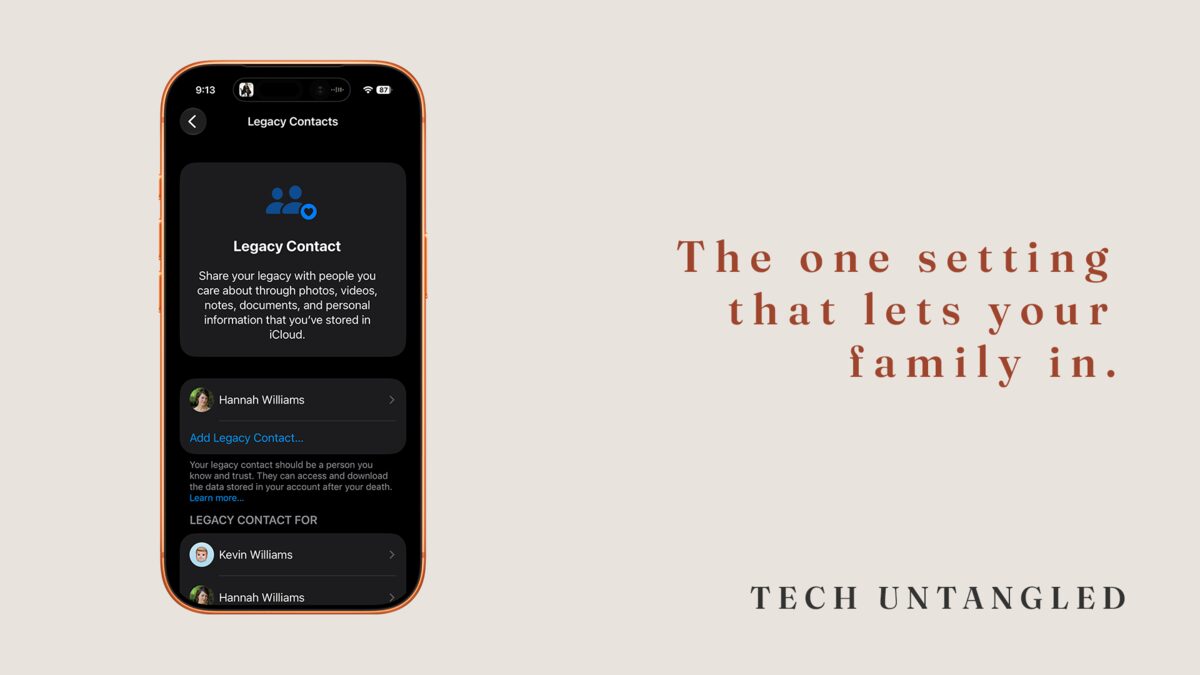
Apple's version is the most straightforward. You pick one or more Legacy Contacts. When you die, they use an access key you gave them plus a death certificate to request access. Apple reviews it, and if everything checks out, they get a temporary account with your photos, messages, notes, files, contacts, and calendar. Three years to download it all before the account is permanently deleted.
They won't get your passwords, your payment info, or anything you purchased through Apple. Licensed content stays with the account.
Settings > [Your Name] > Sign-In & Security > Legacy Contact. Two minutes.
Your Legacy Contact doesn't need an iPhone. They don't even need an Apple Account. They just need that key and the death certificate when the time comes.
Google: The One That Watches the Clock
Google doesn't wait for someone to report a death. It watches for silence.
You set a waiting period, anywhere from 3 to 18 months. If Google sees no sign of you for that long, no sign-ins, no Gmail, no Android check-ins, it triggers your plan. You can designate up to 10 people and pick exactly which data each person gets. Photos for one. Drive for another. Gmail for a third.
Google will try to reach you first. Emails to your Gmail, emails to your recovery address. Only after silence does the system notify your contacts and hand over download links.
Here's the part people miss: Google will delete inactive personal accounts after two years of inactivity whether or not you set this up. Your data already has an expiration date. Inactive Account Manager is how you decide what happens before that clock runs out.
Go to myaccount.google.com . Data & Privacy. Scroll to "Make a plan for your digital legacy."
Microsoft: The One That Didn't Bother
Apple built a system. Google built a system. Microsoft looked at what both of them did and, for the most part, shrugged.
They added a Digital Legacy feature for OneDrive. Files and photos. Your designated contact can get read-only access with a code and a death certificate. Fine.
But your Outlook email? Your calendar? Your contacts? Your Microsoft 365 data? No pre-death setup. No Legacy Contact. No automated plan. If your family doesn't have your login credentials, Microsoft's official guidance is that they may need a court order. And even with one, Microsoft says it may not be able to help.
This is a trillion-dollar company. They had the same amount of time as Apple and Google to build this. They covered one product and left everything else behind a wall that most families will never be able to climb.
If you depend on Microsoft for anything important, here's the blunt advice: don't wait for Microsoft to solve this. Use a password manager with emergency access, or put your credentials in your estate documents. Because they haven't built the bridge and there's no sign they're planning to.
Why None of This Is Really About Technology
All three platforms have the same underlying rule: if you don't set something up while you're alive, your family is left trying to convince a company to make an exception to its own privacy policies. And those companies are not in the business of making exceptions.
The setup takes minutes. Every one of these tools is free. The instructions aren't complicated.
So why don't we do it?
Because the setup isn't the hard part. The hard part is sitting across from your mom or your dad and saying, "I need to do something on your phone, and here's why." The hard part is making it real for someone who isn't thinking about it yet.
I've done this for myself and my wife. But reading Lucas's post forced me to admit that I still hadn't done it for my parents or my grandparents. That's on me. And if you're being honest, it's probably on you too.
A family standing in a kitchen three days after a funeral, holding a locked phone, with no way in.
That's what skipping this conversation costs.
One Simple Win
Pick one person. Open your phone and set them up as a Legacy Contact on your Apple Account right now. If you're on Android, go to myaccount.google.com and set up Inactive Account Manager instead.
Then, this week, bring it up with one family member. Not as a lecture. As a favor. "I just set something up on my phone. It took two minutes. Can I help you do it on yours?"
That's it. Two minutes and one awkward conversation.